Tech, minus the jargon
Video chat browser vs app comes down to who holds the camera key. A browser asks site by site; an app answers to the system's settings. All ten services tracked here let you talk to strangers in a browser, and two add Android apps.
Strictly 18+ · After an 18+ tick our video chat opens; then the browser wants your camera and mic.
OpenTalk, from app page to browser chat
The address first turns up in the web archive as a parked page | |
The domain now hosts a landing page for an English conversation app | |
By this month the site has become a random video chat you open in a browser |
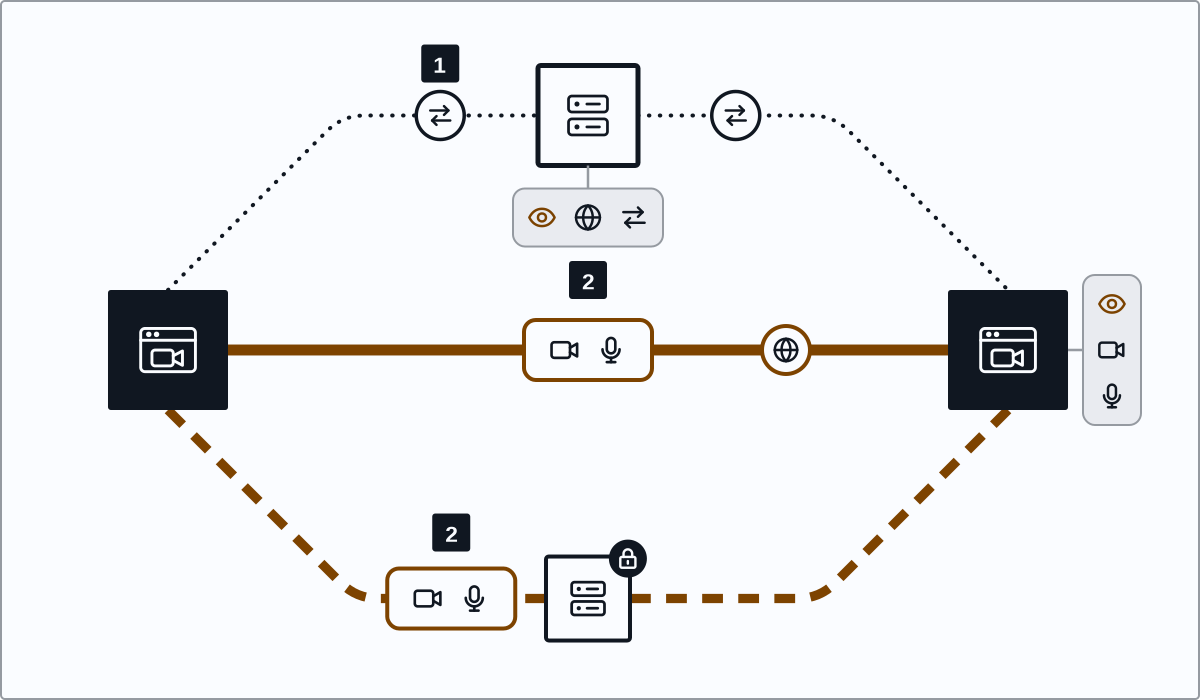
Where the camera permission lives
A browser has two locks. First, the system has to let the browser near the camera at all.
On a Mac, that switch lives in System Settings under Privacy & Security, then Camera. Windows 11 keeps a Camera access switch of its own in Settings.
After that, every site must win the browser over on its own. Chrome raises a fresh pop-up for each new site (Chrome help). Edge also wants a separate yes from each website, even once Windows has cleared Edge itself.
An app has one lock: the system's. An iPhone lists every app that asked for the camera under Privacy & Security in Settings, each with a switch (Apple's guide).
Android gives each app a setting of its own too, and phone app camera settings, option by option get a page to themselves.
That's the core difference. A browser's yes belongs to one site. An app's yes covers the whole app.
Is a browser or an app easier to undo?
The browser, by a nose. Any one site's permission can go without touching the rest:
An app loses access in the system's list instead, or all at once when you delete it. Both take a minute. The browser just lets you be pickier.
One trap belongs to browsers alone. Chrome can keep a camera running in a background tab, flagged with a small indicator. Switching tabs isn't hanging up. Close the tab.
How to tell the camera is on
The system tells you, whichever route you took. An iPhone shows an indicator in the status bar while the camera or microphone is in use.
Android puts one at the top right of the screen. Tap it and it names the app.
A Mac lights the lamp beside its camera. Windows uses the camera light or a notification, plus a microphone icon in the taskbar.
Browsers add a marker of their own: Chrome on the tab, Firefox as a pulsing icon in the address bar. The check is the same for browser and app. Handy, that.
What does the stranger's side receive?
The same picture and voice, whichever door you came through. A browser won't blur your room or hide your face any better than an app.
In a browser, live video is carried by WebRTC, a standard built for real-time calls on the web. According to the W3C specification, a WebRTC connection hands the other side the IP addresses offered for the call.
Whether a given app takes the same route isn't something these ten services publish.
Rather not send video at all? Typing-only chats with strangers skip the camera prompt entirely.
Browser or app for your first chats?
For video chat browser vs app on a first try, the records lean one way. All ten services run in a browser. Nothing needs installing.
OpenTalk also has an Android app, and so does Yapping. No iPhone app is confirmed for any of the ten.
An app earns its home-screen spot once one service becomes a regular habit. Until then, a tab is easier to close, easier to audit and easier to forget.
For more on where to begin, the Next Seat home page for meeting strangers online covers the basics.
The gist
The video chat browser vs app choice is mostly about control. A browser asks per site, lets you revoke per site and needs no install; just close the tab when you're done. An app's access lives in the system's settings until you switch it off. The stranger sees the same thing either way.